Roster
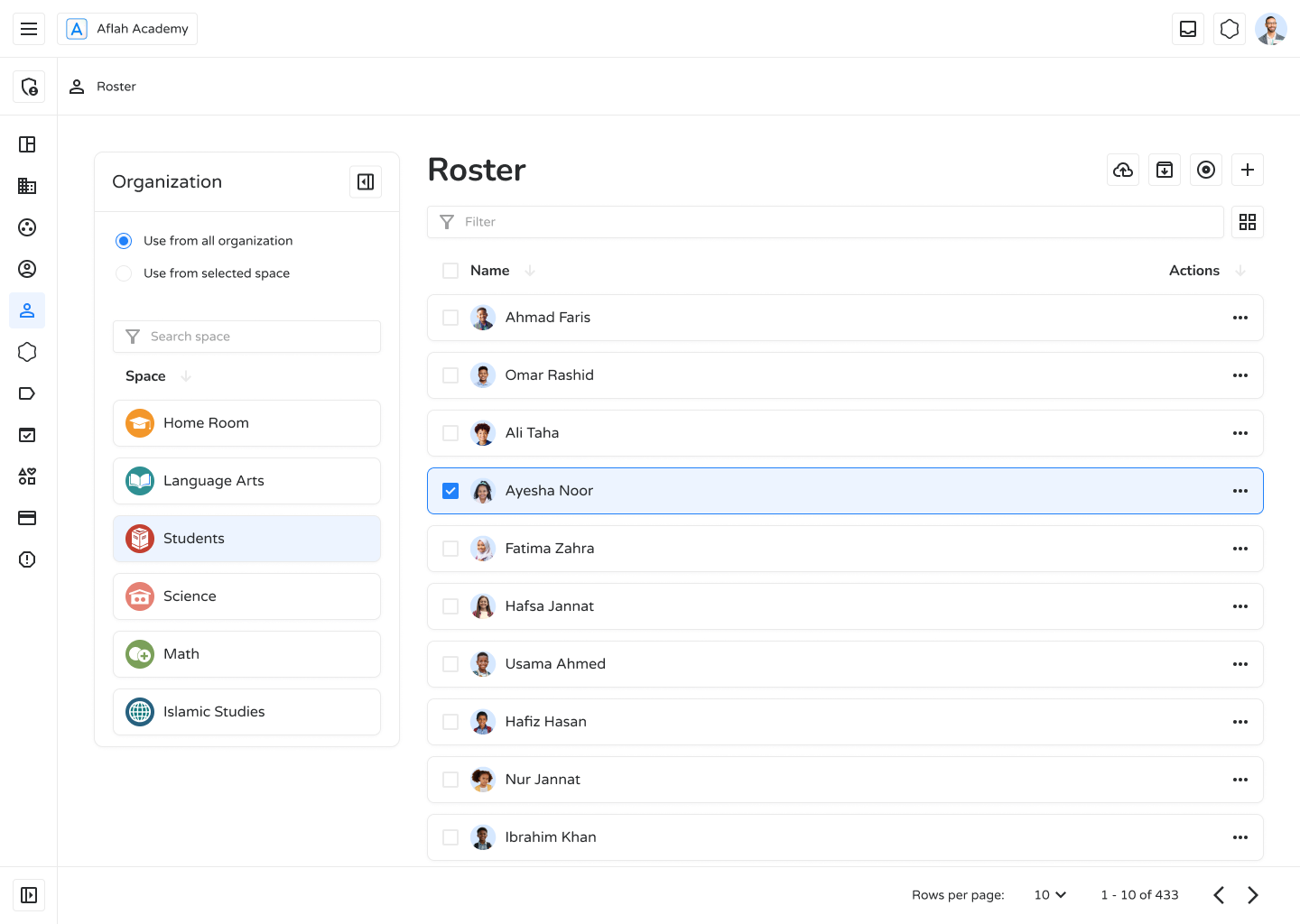
The Roster page is a centralized dashboard for administrators to view, track, and manage users across organizations or spaces within Ilmiya. It provides insights into user activity, login history, and enables quick administrative actions.
Key Features
Section titled “Key Features”- Organization Filters — View users from all organizations or narrow to a specific space.
- Search & Filter — Quickly find users by name or username.
- User List — Displays usernames, profile icons, last login date, and action buttons (•••) for management options.
- Support Access — Floating chat icon for quick customer support.
What You Can Do
Section titled “What You Can Do”| Action | How |
|---|---|
| View Users | See all registered users or filter by space |
| Search Users | Locate individuals efficiently via the search bar |
| Monitor Activity | Track last login dates to identify inactive accounts |
| Manage Users | Use the action menu (•••) to edit details or assign classes |
| Filter by Space | Focus management on specific groups when needed |
Why the Roster Matters
Section titled “Why the Roster Matters”- User Management — Keeps a complete, up-to-date record of all registered users.
- Security & Access Control — Monitors login activity to flag unusual account behavior.
- Efficiency — Streamlines user oversight and reduces the overhead of administrative tasks.
The Roster page is a vital tool for administrators — enabling efficient, secure, and organized management of users across the Ilmiya platform.